
Help centre / Stock
Set prices by quantity (1 to 19, 20 to 49, 50 and more)
Sell cheaper when a customer buys more, the way wholesale price lists work. The till and online shop pick the right price by themselves.
For: Managers and owners
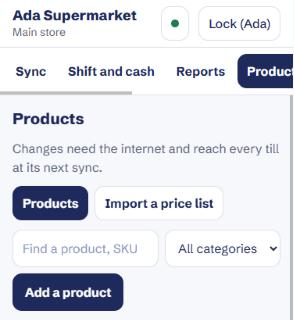
- Go to Manage, then Products, and press Add a product. To change a product you already have, tap it in the list instead.
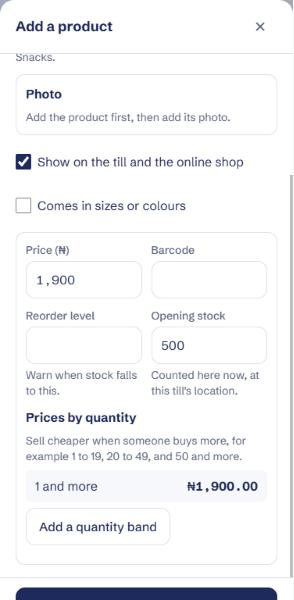
- Enter the name, category and the normal price. The normal price is what one item costs.
- Under Prices by quantity, press Add a quantity band.
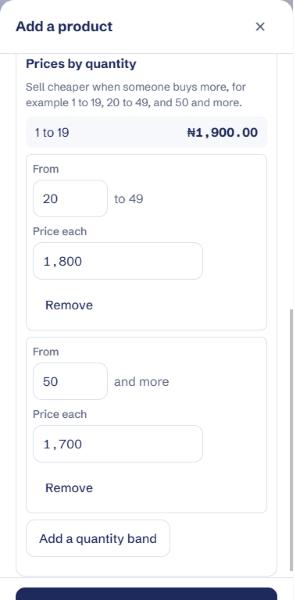
- In From, enter the quantity where the cheaper price starts, such as 20. In Price each, enter the price for each item from that quantity, such as 1,800.
- Press Add a quantity band again for the next band, such as from 50 at 1,700 each. The form shows the bands for you: 1 to 19, 20 to 49, and 50 and more.
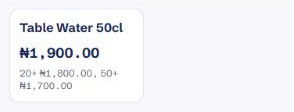
- Press Add product, or Save changes. On the till the product now shows its prices by quantity.
- When you sell, just enter how many. The till uses the right price: 25 bottles are charged at 1,800 each, 60 at 1,700 each.
Each size or colour of a product can have its own bands.
To remove a band, press Remove under it, then save.
Prices by quantity come with the Business plan. You can also load them from a price list: use columns such as price_1_19, price_20_49 and price_50_plus.
Changing prices needs the internet. Every till picks the change up at its next sync.